Guides
Tablet and e-reader buying guide: what to check
Tablet and e-reader buying guide to assess reading and work needs, file access, display comfort, connectivity, accessories, support, and repairability.
What to take away
- Buy for a defined job, not for a processor name or screen size alone.
- A tablet suits mixed apps and media; an e-reader favors long-form reading and simpler controls.
- Confirm book formats, store access, library service, note export, and offline behavior.
- Test display comfort, controls, weight, charging, wireless, and accessibility before the return window closes.
- Count the case, pen, keyboard, adapter, warranty, and likely repair costs.
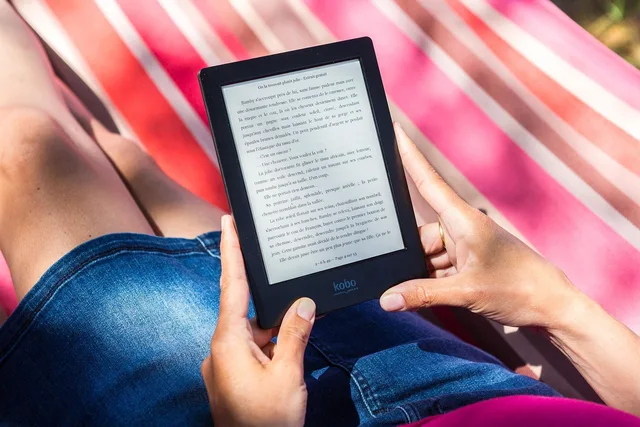
This tablet and e-reader buying guide starts with a simple distinction: the devices can show the same novel, but they prioritize differently. A tablet is a general computer with a bright color screen, apps, cameras, audio, and optional keyboard or pen.
A dedicated e-reader narrows the job to reading, annotation, and sometimes handwriting. That narrower design can mean lower weight, fewer interruptions, and longer time between charges. The technology buying guide supplies the general job-first method this guide narrows to reading devices.
Write the job before shopping
List what the device must do during a normal week. Separate requirements from preferences. A useful worksheet covers:
Device job worksheet
- List novels, textbooks, comics, PDFs
- Note handwritten notes, calls, entertainment
- Check library, school, workplace apps
- Confirm color, audio, camera, keyboard
- Test outdoors, at night, in transit
- Set max weight and time off power
- Add two real files and services
Add two real files and two real services to the test. A device that opens a sample PDF may still handle a 500-page scanned manual poorly. A store listing that says "supports ebooks" does not prove it can borrow from your library or display a protected textbook. Turn these lines into pass conditions with the shortlist method.
Choose the device class
Dedicated e-reader
- Long novels
- Usually a strong fit
- Color comics and video
- Limited on many models
- Handwritten notes
- Model dependent
- Full desktop-style work
- Poor fit
- Outdoor reading
- Often good
- Distraction control
- Fewer app interruptions
General tablet
- Long novels
- Works, but the lit screen may be less comfortable
- Color comics and video
- Strong fit
- Handwritten notes
- Common with a compatible pen
- Full desktop-style work
- App dependent
- Outdoor reading
- Glare and brightness matter
- Distraction control
- Requires settings and discipline
Tablet with keyboard
- Long novels
- Works, with extra weight
- Color comics and video
- Strong fit
- Handwritten notes
- Common with a compatible pen
- Full desktop-style work
- Better, but not always laptop-equivalent
- Outdoor reading
- Same display limits as tablet
- Distraction control
- Requires settings and discipline
Do not assume a keyboard case turns a tablet into a laptop. Check file handling, window management, browser behavior, printer support, external displays, local development tools, and any required extensions. The physical keyboard may also make the package thicker and heavier than a small laptop. The tablet, e-reader, and laptop comparison works this category question in full.
For a starting shortlist, investigate Amazon Kindle Paperwhite and Kobo Clara BW e-readers, alongside Apple iPad Air and Samsung Galaxy Tab S FE tablets. These are examples to research, not a head-to-head recommendation; verify the exact model and generation, local availability, support, and repair options.
E-reader vs tablet vs keyboard tablet
Dedicated e-reader
- Long novels
- Strong fit
- Color comics and video
- Limited
- Handwritten notes
- Model dependent
- Desktop-style work
- Poor fit
- Outdoor reading
- Often good
- Distraction control
- Fewer interruptions
General tablet
- Long novels
- Less comfortable
- Color comics and video
- Strong fit
- Handwritten notes
- Pen needed
- Desktop-style work
- App dependent
- Outdoor reading
- Glare matters
- Distraction control
- Needs discipline
Tablet with keyboard
- Long novels
- Extra weight
- Color comics and video
- Strong fit
- Handwritten notes
- Pen needed
- Desktop-style work
- Not laptop-equivalent
- Outdoor reading
- Glare matters
- Distraction control
- Needs discipline
Evaluate the display in context
For text, inspect sharpness at your normal font size, not at a store demo size. Change font, margins, line spacing, warmth, brightness, and dark mode. For PDFs and textbooks, test zooming, page turns, diagrams, footnotes, and side-by-side notes. A small screen can be pleasant for novels yet frustrating for fixed-layout pages.
Display checks in context
- Inspect sharpness at normal font size
- Change font, margins, spacing, warmth
- Test PDF zoom, page turns, diagrams
- Check flicker, glare, minimum brightness
- Check front-light uniformity and color
- Confirm touch or pen with resting hand
Electronic paper usually reflects room light and changes slowly. The E Ink technology inside most e-readers uses a microencapsulated medium that forms a bistable display, one that holds its image without drawing power, which is where week-long battery claims come from.
A conventional tablet produces light and refreshes quickly. Neither description proves comfort for a particular reader. Check flicker sensitivity, glare, minimum brightness, front-light uniformity, color needs, and whether the screen accepts touch or pen input when your hand rests on it.
Verify books, files, and accounts
Make a format table before paying. Record each book's source, file or protection method, required app, offline downloads, and whether notes can leave the service.
Format and account table
- Record each book source and protection
- List required app and offline downloads
- Check whether notes can leave service
- Confirm library availability by country
- Check loan opens on device or phone
- Review account switching and child profiles
The Library of Congress guide to reading electronic books explains that proprietary readers work best with their own proprietary files. PDF, plain text, and web content have broader support but may lose specialized features.
Test the actual ebook route, not just a generic claim of format support. Check EPUB, MOBI, AZW, KFX, and PDF files, and whether the title uses Adobe DRM or Amazon's Kindle content protection. Compare access through Kindle Store, Kobo Store, Google Play Books, and Apple Books; a file or purchase may not transfer freely between ecosystems.
Confirm library availability in your country and library system. Check whether a loan opens on the device itself or requires a phone, browser, or computer for delivery. If several people will share the device, review account switching, child profiles, purchase approval, and privacy between profiles.
For library borrowing, check the exact route through Libby (OverDrive) or Hoopla with your library. App availability, lending catalogs, and delivery methods depend on the library and device, so test a real title before relying on the service.
Size storage and connectivity
Text-only books use little space, but audiobooks, comics, video, scanned PDFs, games, and offline courses do not. Check usable storage after the operating system, whether expansion cards are supported, and which content can move to them. Cloud access does not replace local space when travel or poor reception is part of the plan.
Storage and connectivity checks
- Check usable storage after operating system
- Confirm expansion card support and content
- Price cellular plan and supported bands
- Check eSIM, SIM rules, roaming, lock
- Verify Wi-Fi networks and security types
- Check Bluetooth versions and codecs
For cellular models, price the plan and confirm supported bands, eSIM or SIM rules, roaming, and carrier lock. For Wi-Fi models, verify the networks and security types you use. Check Bluetooth support for headphones, keyboards, switches, and hearing devices, including any version or codec requirements that matter.
Check the whole kit
Add the protective case, screen cover, pen, replacement nibs, keyboard, charger, cable, stand, hub, memory card, and subscription. Confirm which items are included. A low device price can hide an expensive proprietary pen or keyboard. Record the current listed price for each needed item and any subscription fee, rather than assuming the device price covers the complete setup.
Check accessory compatibility by exact device model. Apple Pencil support is model-specific; USI stylus compatibility and Bluetooth HID keyboard support also need to be verified for the tablet you choose.
Check the maker's update period, warranty, accidental-damage terms, battery service, screen repair, parts, and local turnaround. Ask whether service erases data and whether a failed charging port requires a board replacement. For an e-reader, confirm how purchased books and annotations survive a replacement device. Check the maker's official repair and parts information and iFixit's model-specific repair guides or repairability score where available; verify that parts are available for the exact model. Request a written repair quote for the device and location you are considering. The pre-purchase checklist collects these terms before money moves.
Run an acceptance test
During the return period, verify exact model, storage, radios, charger, and warranty, and check account status.
Test every button, port, speaker, microphone, camera, then test pen area, keyboard key, wireless connection, sleep function, rotation sensor.
Open planned files, borrow a book if possible, download content, turn off Wi-Fi, confirm it remains readable. Buying second-hand? used tablet and e-reader inspection extends this test to ownership and battery checks.
Use the device in the chair, bed, train, classroom, or workshop where it will live. Ten minutes of realistic use exposes grip strain, glare, awkward controls, and weak cases faster than a specification sheet. Once it passes, the setup and care routine locks in accounts, backups, and updates.
Common questions
Is an e-reader better than a tablet for reading?
It can be for long text sessions, outdoor use, low weight, and fewer distractions. A tablet is stronger when color, video, varied apps, or complex documents matter.
How much storage does an e-reader need?
Text libraries need modest space. Audiobooks, comics, scanned documents, and offline collections can require much more, so estimate from your own files.
Should I pay for cellular service?
Only if you need downloads or connected apps away from dependable Wi-Fi and the supported plan, bands, and ongoing price fit your use.
Does a tablet replace a laptop?
Sometimes. Test the exact applications, files, peripherals, browser functions, multitasking, and keyboard workflow before treating it as a replacement.
In this guide
- Tablet and e-reader setup for comfortable, safe readingTablet and e-reader setup for secure accounts, updates, backups, reading comfort, battery care, and repair checks that help your device last.
- Tablet vs e-reader vs laptop: category-level tradeoffsTablet vs e-reader vs laptop guide to category-level tradeoffs in reading, study, travel, accessibility, files, repair, and work habits.
- Used tablet and e-reader checklist: locks, screen, batteryUsed tablet and e-reader checklist for account locks, screen and battery tests, plus model support, connectivity, accessories, records, and safer payment.
- Tablet and e-reader troubleshooting: charging, frozen screens, touch faultsTablet and e-reader troubleshooting: safe checks for weak charging, frozen screens, and touch faults, plus a written fault record for repair.
- Library ebook compatibility: a buyer's checklistUse this library ebook compatibility checklist to test loan routes, file formats, and device setup before buying an e-reader or tablet in the US.